Path: Student Information > General > Programs
The Programs tool is tool is used to track a student's participation in programs such as school clubs, intramural sports, and community education participation. Programs can include sessions, or periods of time during which students participate in a program.
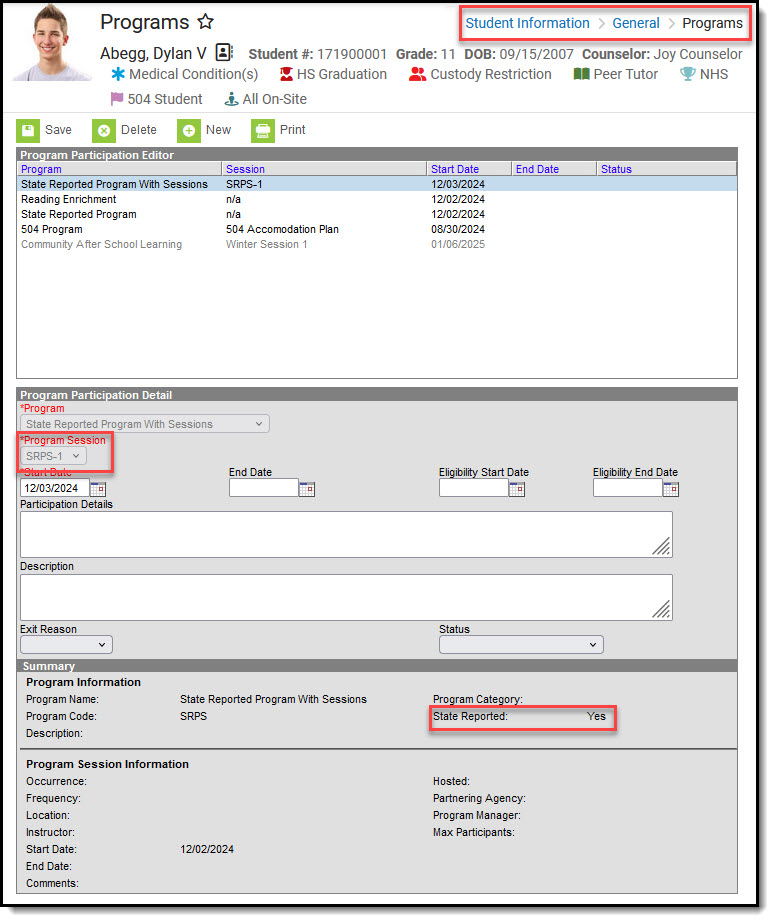 Information about programs to which a student has been assigned can be accessed with this tool.
The Student Information > General > Programs tool is used for tracking a student's participation in programs such as school clubs, intramural sports, and community education participation.
The Student Information > Academic Planning > Programs tool is used to track information related to Graduation requirements or special Academic programs for a student.
- Graduation Program: Sets graduation requirement criteria for students assigned to the program Students can only be assigned to one Graduation Program at a time.
- Academic Program: Sets criteria for special programs such as CTE (Career and Technical Education) or other programs, for example those that earn some kind of certificate or other achievement. Students can be assigned to multiple Academic Programs.
See the Programs (Student Information) Tool Rights article for information about rights needed to use this tool.
General information
The Programs tool is tool is used to track a student's participation in programs such as school clubs, intramural sports, and community education participation. Programs can include sessions, or periods of time during which students participate in a program. These programs are created with the Program Setup tool.
A student can only be assigned to Program Sessions that are active within the date range of the calendar currently selected in the Context Switcher. These are Program Sessions that have a Start Date on or before the Start Date of the selected calendar, and/or Program Sessions that have an End Date that is blank (null), within or after the End Date of the selected calendar.
Program participation detail summary
The Summary section of the Editor is a read-only view of the selected program. It lists the program, any associated sessions, the assigned program category, staff leading the program session, and participation dates. Information displays when a Program is selected.
- All of these fields are populated when the Program and the Program Session are created.
- Program Sessions include a Max Participant field, indicating the number of participant that session can have. This is not an enforced value, but rather a recommendation.
- When a student is added to a program session that meets this entered value, a pop-up message displays indicating such. The student can still be added to the session, but know that enrollment has exceeded this recommended value.
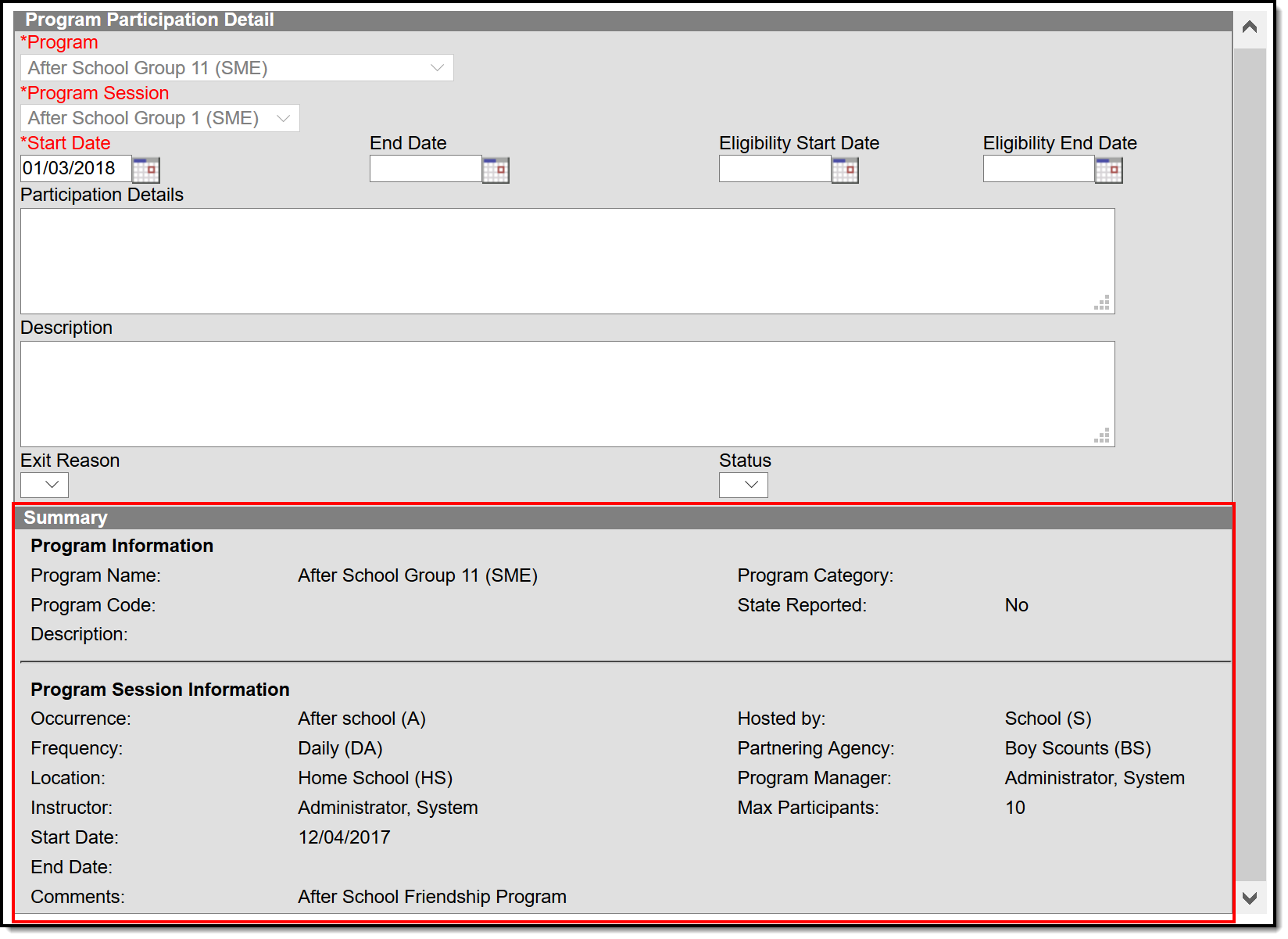 Users may view summary details of a selected program.
Assign program to student
Follow these procedures for adding a program to one student. Use the Batch Assignment Tool to assign multiple students to the same program.
- Click the New icon. A Program Participation Detail editor displays
- Select the appropriate Program from the dropdown list
- If applicable, select a Program Session from the dropdown list
- Enter the Start Date
- Enter information on the Participation Details and the Description of the program
- Click the Save icon when finished.
The student's start date in a program session must be on or after the program session start date. The student's end date must be on or before the program session end date.
- A program session has a start date of October 1 and an end date of November 25.
- The student must be assigned start and end dates for that program session within those dates.
- A start date for the student in the program session of September 30 cannot be entered, nor can an end date of December 1.
The same date logic applies to the Eligibility Start and End Dates.
Modify/delete student program assignments
- Select the program from the Program Participation Editor
- Enter or update information as needed.
- When entering/changing dates:
- Dates that were entered incorrectly may be changed
- Start and End Dates should be entered even if a student only participated for one day.
- Save
- Delete should only be used when the incorrect program was assigned to a student, as this removes any record of the student being involved in the program.
Print student program assignments
The Print icon generates a Programs Participation Detail Report in PDF format.
- The report includes a list of programs assigned to the student.
- Active programs and active programs with sessions display first, then inactive programs and inactive programs with sessions.
- Programs that have a future end date are considered active (until the date has passed).
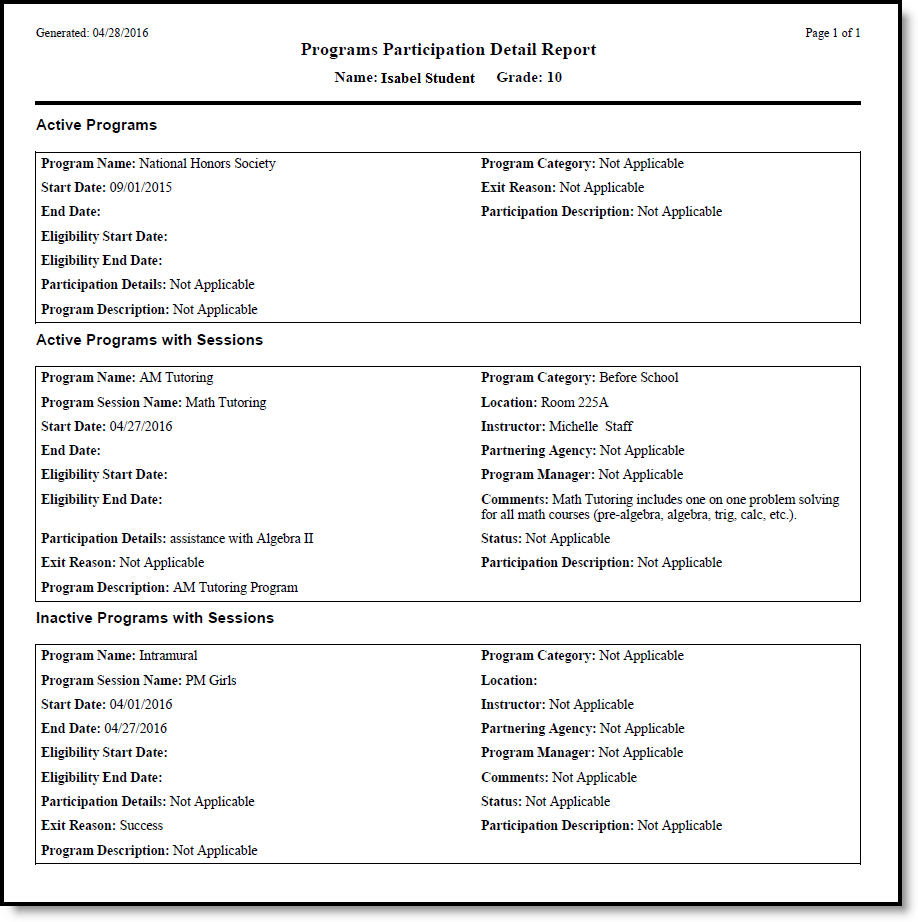 A report summarizing a student's program information can be generated.
Program participation editor fields
| Field | Description |
|---|---|
Program Required |
Indicates the name of the program being assigned to the student. These programs are created in the Programs tool. Active programs and inactive programs are available for selection (inactive programs display in gray text). More than one program can be assigned to a student at one time (unlike Graduation Programs). |
Program Session Required |
Indicates the session of the program to which the student is assigned. This field only displays when the selected Program contains a Program Session. Sessions provide a date range of participation (like an after school sports program for the fall or a community education program). |
Start Date Required |
Indicates the date the student was first involved in the program. Dates are entered in mmddyy format or can be entered by using the calendar icon. |
| End Date | Indicates the date the student stopped participation in the program. Dates are entered in mmddyy format or can be entered by using the calendar icon. |
| Eligibility Start Date | Indicates the date the student was eligible for the program. Dates are entered in mmddyy format or can be entered by using the calendar icon. |
| Eligibility End Date | Indicates the date the student was no longer eligible for the program. Dates are entered in mmddyy format or can be entered by using the calendar icon. |
| Participation Details | Provides information on the student's involvement in the program. |
| Description | Provides further information on the student's involvement in the program. |
| Exit Reason | Indicates the reason the student stopped participation in the program.
Options for this field need to be created in the Attribute/Dictionary (ProgramParticipation > Exit Reason). |
| Status | Indicates the student's status in the program. This field only displays when the selected Program contains a Program Session.
Options for this field need to be created in the Attribute/Dictionary (ProgramParticipation > Status). |
