Tool Search: Behavior
The Behavior Referral tool allows school staff members to complete an online referral for a student behavior event and submit it to a staff member responsible for managing behavior for further action (Behavior Management). North Dakota's Suspension, Expulsion, & Truancy Report pulls data from the Behavior record. Districts must enter all state-reported behavior in the Behavior Module for this reported data to be accurate.
The following outlines key fields required for accurate submission of North Dakota's Suspension, Expulsion, & Truancy Report.
Please see the core Behavior documentation for additional information about setting up and using the Behavior tools.
Behavior Referral
A Behavior Referral consists of two parts: Incident Information, which provides general information about the behavior incident, and Events and Participants, which describe the individual events within the incident and the participants in each event.
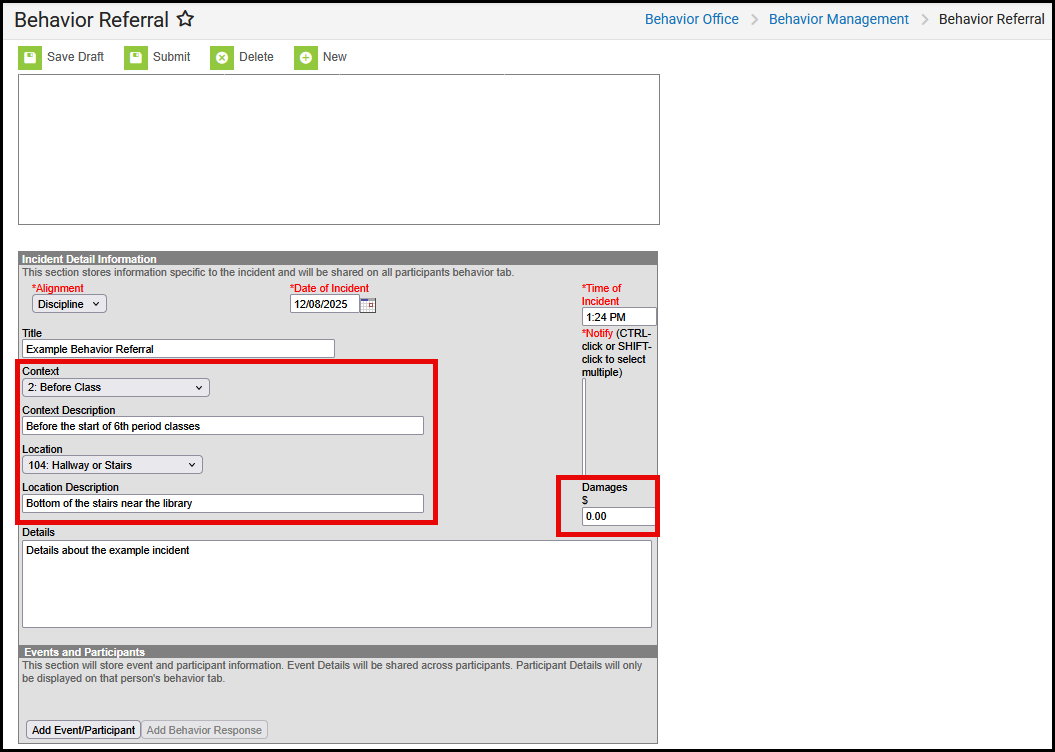
Incident Detail Information
| Field | Description |
| Context | Indication of the setting or time of day the incident took place.
|
| Location | Where the incident took place.
|
| Damages | The total cost of all damages that occurred as a result of the incident.
Note: This was previously addressed via "Victim Code" in North Dakota's legacy SIS system. |
Behavior Management
This tool allows users with the appropriate tool rights to enter new behavior incidents and manage existing behavior incidents, including adding the appropriate incident resolution.
 Behavior Management Incident Detail Editor
Incident Detail Information (Management)
| Field | Description |
| Damages | The total cost of all damages that occurred as a result of the incident.
Note: This was previously addressed via "Victim Code" in North Dakota's legacy SIS system. |
| Context | Indication of the setting or time of day the incident took place.
|
| Location | Where the incident took place.
|
Event and Participant Detail Information
If an incident contains a state-reported event/resolution, a participant must be attached.
It is ultimately up to the district to determine if they want to allow incidents to be completed without a participant (Behavior Preferences), but any records that should sync to the state must have one.

| Field | Description |
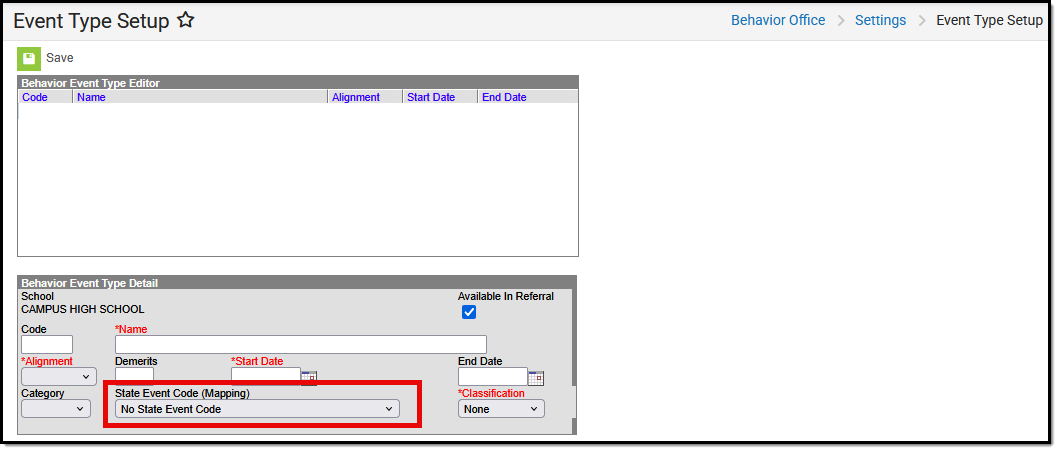
| Event Type | The event's identifying code and name, sorted alphabetically by name. Event types can be mapped to State Event Codes.
|
| Police Involved | Indicates police involvement |
| Felony Flag | Indicates the incident is designated as a felony. |
| Role | The manner in which the individual participated in the event.
Note: This was previously addressed via "Victim Code" in North Dakota's legacy SIS system. |
| Relationship to School | How the participant is associated with the school.
Note: Participants without enrollments/staff assignments do not sync to the state edition. Schools should not align parents/etc. to a behavior event because it blocks the event from syncing.
|
Behavior Management Resolution Fields
Behavior Resolutions are added to an incident and then applied to the appropriate participants.
For additional information about this tool, please see Add a Behavior Resolution.
| Field | Description |
| Resolution Type | The identifying name and code of the resolution, sorted alphabetically by name. Resolution Types can be mapped to State Resolution Codes.
|
| Arrest | Indicates the student was arrested in relation to the behavior incident. |

