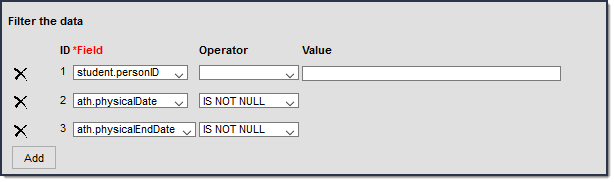
An Ad Hoc filter can be selected on a School Store item to limit purchases to specific recipients. Only people who are included in the Ad Hoc filter and have an active enrollment in the active calendar year can be selected as a Recipient when a purchase is made.
The Ad hoc filter must always include the Person ID: Student > Demographics > Person ID (student.personID).
Sample School Store Ad Hoc Filters
Filter for Students Scheduled in a Class
This filter restricts purchases to students who are scheduled in a class, such as when purchasing course materials.
Student > Demographics > Person ID: student.personID
Student > Learner > Schedule > Course/Section:courseSection.courseNumber OR courseSection.courseName
| Field | Operator | Value |
|---|---|---|
|
The values provided here are applicable for finding students scheduled in a course with "band" in the name. Modify these values as necessary | ||
| courseSection.courseName | Contains | band |

Filter for Students in a Grade
This filter restricts purchases to students in grades 11 or 12, such as parking passes.
Student > Demographics > Person ID: student.personID
Student >Demographics>Grade: student.grade
| Field | Operator | Value |
|---|---|---|
| student.grade | IN | 11,12 |

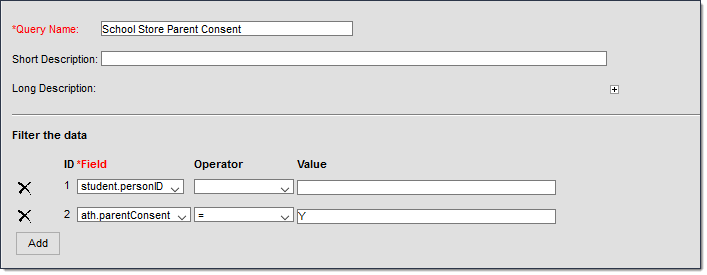
Filter for Students with a Parent Consent of Yes
This filter restricts purchasing to students who have a parent consent of yes on their Athletics record.
- Student > Demographics > Person ID: student.personID
- Student > Activities > Athlete Eligibility > parentConsent: ath.parentConsent
| Field | Operator | Value |
|---|---|---|
| ath.parentConsent | = | Y |
Filter for Students with an Active Physical Form
This filter restricts purchases to students with an active physical on record.
- Student > Demographics > Person ID: student.personID
- Student > Activities > Athlete Eligibility > physicalDate: ath.physicaldate
- Student > Activities > Athlete Eligibility > physicalEndDate: ath.physicalenddate
| Field | Operator | Value |
|---|---|---|
|
The values provided here are applicable for the 2025-2026 school year. Modify these dates as necessary or use the IS NOT NULL Operator. | ||
| ath.physicaldate | > | 09/01/2025 |
| ath.physicalenddate | < | 09/01/2026 |