Campus provides tools that customers can use to view, enter, track and report data related to students participating in various programs. Fields, field titles, and available tools vary by state. You may see tools mentioned in this article that your state does not use.
Most of these tools use standard R/W/A/D rights, but a few have Subrights as outlined in this article.
Follow local state practices when entering program information for students.
Follow the article links in the tables below to learn how to use individual Program Participation-related tools.
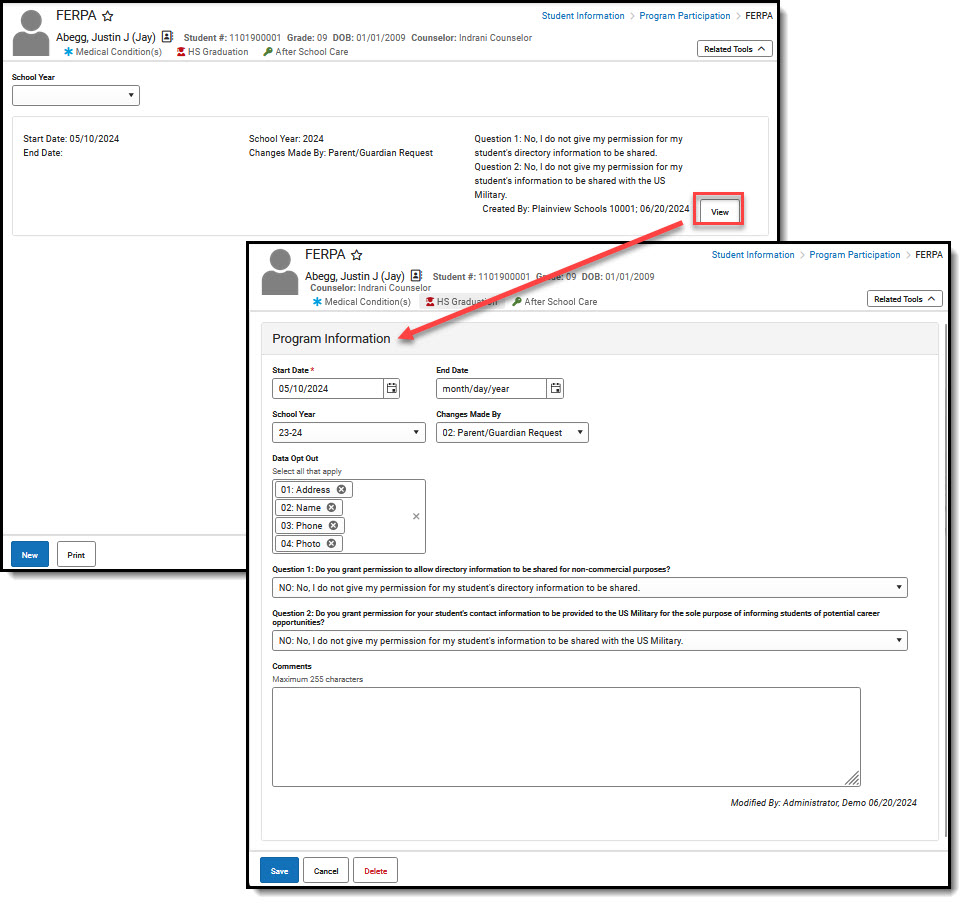 Program Information Example - FERPA
General Program Participation Tool Rights
Follow the program name article links in the table to learn more about how each of these tools functions.
| Program Name | R | W | A | D |
|---|---|---|---|---|
| Career Readiness | View existing records. | Edit existing records. | Add new records. | Delete records. |
| Career and Technical Education (CTE) | ||||
| Early Learning/Early Childhood | ||||
| FERPA | ||||
| Foster Care | ||||
| Gifted (Gifted and Talented) | ||||
| Migrant | ||||
| Section 504 | ||||
| Summer EBT | ||||
| Title I (Title Programs) |
Homeless Tool Rights
The Homeless program includes a subright that overrides top-level rights to prevent overlapping records. Related Homeless Services may be recorded via the Program Services tool.
| Top-Level Rights | R | W | A | D |
|---|---|---|---|---|
| Homeless | View existing records. | Edit existing records. | Add new records. | Delete records. |
| Subrights | R | W | A | D |
|---|---|---|---|---|
| Add & Auto-end Records | Create a new record (this end dates existing record one day previous to the new record's start date). | N/A | N/A | N/A |
Migrant Tool Rights
Currently, customers will either use the Migrant tool or a set of tools (Migrant Eligibility, Migrant Enrollment, Program Services - Migrant Services) to enter and manage information for their Migrant students.

| Program/Tool | R | W | A | D |
|---|---|---|---|---|
| Existing Customers | ||||
| Migrant | View existing records. | Edit existing records. | Add new records. | Delete records. |
| New Customers/Customers using Migrant Workflow Tools | ||||
| Migrant Eligibility | View existing records. | Edit existing records. | Add new records. | Delete records. |
| Migrant Enrollment | ||||
Program Services Tool Rights
Available Program Services vary by state. Tool rights are the same unless otherwise noted. It is possible to grant users full rights to one program service and partial rights to another.

| Top-Level Rights | All |
|---|---|
| Program Services | Turn on/off all rights at the parent and subright level. |
| Subrights | R | W | A | D |
|---|---|---|---|---|
| Homeless Services |
View existing services records in the Program Services tool. | Edit existing services records. | Add new services records. | Delete services records. |
| Migrant Services | ||||
| Gifted Services |
Title Funded Programs Tool Rights
Available title funded programs vary by state.

| Top-Level Rights | All |
|---|---|
| Title Funded Programs | Turn on/off all rights at the parent and subright level. |
| Subrights | R | W | A | D |
|---|---|---|---|---|
|
View existing records. | Edit existing records. | Add new records. | Delete records. |
State Edition - State Users Publishing Tool Rights
State Edition users at the State level may need access to tools that allow them to publish new records or changes to records from the State down to the District level. These tools are found in the Group Tool Rights Editor under Student Information > Program Administration and Student Information > Program Participation.
In order to publish federal program data, users must have at least W(rite) rights to the Federal Programs Publishing tool.
 Federal Programs Publishing Tool Rights
Users also need at least W(rite) rights to the Publish Foster Care Records and Publish Migrant Records sub-rights in order to publish record.
 Publishing Subrights
Suggested User Groups
Assign rights to user groups as appropriate for the programs your district/state uses.
