Path: Reporting > CO Data Pipeline > Student Interchange
The Student Demographic Report captures and verifies students' attributes during their enrollment in the district for the selected school year.
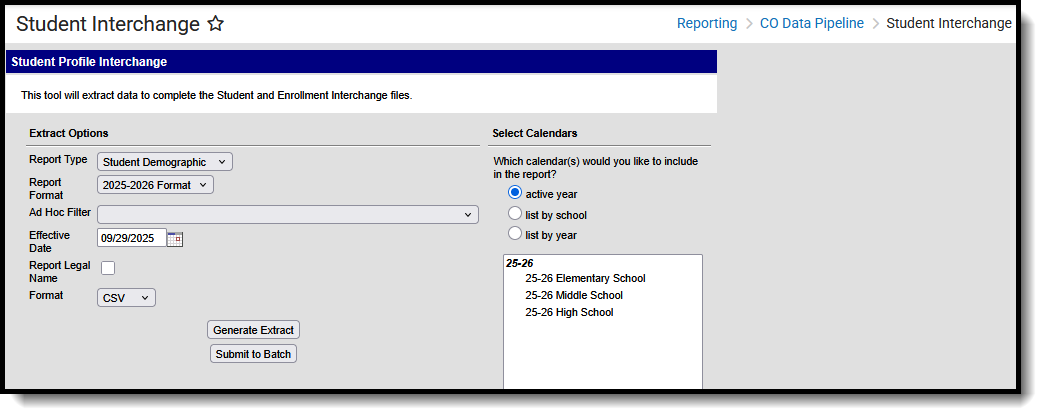 Student Demographic Report
Read - Access and generate Student Interchange Extracts.
Write - N/A
Add - N/A
Delete - N/A
For more information about Tool Rights and how they function, see the Tool Rights article.
Report logic
One record reports for all students enrolled in the selected calendar(s) with a primary enrollment as of the entered effective date. Students are included in the report when they have an active primary enrollment as of the effective date or a prior primary enrollment during the selected school year. The effective date determines which primary enrollment from which to report data, not to exclude students who were enrolled earlier in the selected school year.
- When the student does not have an active primary enrollment as of the effective date, the student's most recent primary enrollment from the selected year reports.
- When there is more than one active primary enrollment for the student, the enrollment with the latest start date is used. If the start dates are the same, the enrollment with the highest enrollmentID is used.
Students are not included in this report when:
- Enrollment records are marked as No Show
- Enrollment records are marked as State Exclude.
- Enrollment Grade Level has a Kindergarten Schedule mapped to 002: Infant.
- Grade levels are marked as State Exclude.
- Calendars in which the student is enrolled are marked as State Exclude
Report editor
| Field | Description |
|---|---|
| Report Type | Selection determines the Student Interchange report that is generated. Choose Student Demographic. |
| Report Format | Selection indicates which layout of the report generates.
When choosing a 2026-2027 calendar, choose the 2026-2027 Format. When choosing a 2025-2026 calendar, choose the 2025-2026 Format. |
| Ad hoc Filter | Select a saved ad hoc filter to only include those students in the filter in the report, assuming those students meet the reporting logic and business rules of this report. |
| Effective Date | The entered date is auto-populated with the current date and is used to determine which enrollment record from which to report data. |
| Report Legal Name | When marked, the student's name and gender report from the Protected Identity Information section on the student's Identities record. |
| Format | The Student Demographic report can be generated in either CSV or HTML formats. |
| Calendar Selection | At least one calendar needs to be selected to generate the report. Reports can be selected by Active Year, School, or Year. |
| Report Generation | The Student Demographic extract can be generated immediately using the Generate Report button. Or, use the Submit to Batch button to select when the report is generated. See the Batch Queue article for more information on this functionality. |
Generate the report
- Select the Student Demographic option from the Report Type field.
- Select the correct Report Format.
- If desired, select students from an existing Ad hoc Filter.
- Enter the desired Effective Date.
- Mark the Report Legal Name, if desired.
- Select the Format of the report.
- Select the Calendar(s) from which to report information.
- Click the Generate Extract button or use the Submit to Batch button. The report displays in the desired format.
Report layout
All name fields (student names, guardian names, staff names) and Course Names can only include alphabetic letters, numbers, periods, hyphens, and apostrophes. Any special characters (accent marks, etc.) will be removed and replaced with the corresponding letter.
| Data Element | Description | Location |
|---|---|---|
| District Code | The number assigned to a school district by the state department of education.
Numeric, 4 digits |
District Information > State District Number
District.number |
| SASID | A unique number assigned to a student by the Department of Education.
Numeric, 10 digits |
Demographics > Person Identifiers > Student State ID
Person.stateID |
| LASID | A unique number assigned to a student by the local school district.
Numeric, 10 digits |
Demographics > Person Identifiers > Student Number
Person.studentNumber |
| First Name | Reports the student's first name.
When the Report Legal Name checkbox is marked, the student's First Name reports from the Legal First Name field.
Alphanumeric, 30 characters |
Demographics > Person Information > First Name
Identity.first Name Identities > Protected Identity Information > Legal First Name
Identity.legalFirstName |
| Middle Name | Reports the student's middle name. When there is no middle name, field reports NMN.
When the Report Legal Name checkbox is marked, the student's Middle Name reports from the Legal Middle Name field.
Alphanumeric, 30 characters |
Demographics > Person Information > Middle Name
Identity.middleName Identities > Protected Identity Information > Legal Middle Name
Identity.legalMiddleName |
| Last Name | Reports the student's last name.
When the Report Legal Name checkbox is marked, the student's Last Name reports from the Legal Last Name field.
Alphanumeric, 30 characters |
Demographics > Person Information > Last Name
Identity.last Name Identities > Protected Identity Information > Legal Last Name
Identity.legalLastName |
| Gender | Reports the student's gender.
When the Report Legal Name checkbox is marked, the student's Gender reports from the Legal Gender field.
Numeric, 2 digits |
Demographics > Person Information > Gender
Identity.gender Identities > Protected Identity Information > Legal Gender
Identity.legalGender |
| Birth Date | Student's date of birth.
Date field, 8 characters (MMDDYYYY) |
Demographics > Person Information > Birth Date
or Identities > Identities Editor > Birth Date Identity.brithDate |
| Hispanic Latino Ethnicity | Indicates the student is of Hispanic/Latino ethnicity. Reports 1 when the Hispanic checkbox is marked; otherwise, reports 0.
Numeric, 1 digit |
Demographics > Race/Ethnicity > Hispanic/Latino
or Identities > Identities Editor > Hispanic/Latino Identity.hispanicEthnicity |
| American Indian Alaska Native | Indicates the student is of American Indian or Alaska Native ethnicity. Reports 1 when the American Indian checkbox is marked; otherwise, reports 0.
Numeric, 1 digit |
Demographics > Race/Ethnicity > American Indian or Alaska Native
Identities > Identities Editor > American Indian Alaska Native RaceEthnicity.code |
| Asian | Indicates the student is of Asian ethnicity. Reports 1 when the Asian checkbox is marked; otherwise, reports 0.
Numeric, 1 digit |
Demographics > Race/Ethnicity > Asian
Identities > Identities Editor > Asian RaceEthnicity.code |
| Black or African American | Indicates the student is Black or African American ethnicity. Reports 1 when the Black or African American checkbox is marked; otherwise, reports 0.
Numeric, 1 digit |
Demographics > Race/Ethnicity > Black or African American
Identities > Identities Editor > Black or African American RaceEthnicity.code |
| White | Indicates the student is White. Reports 1 when the White checkbox is marked; otherwise, reports 0.
Numeric, 1 digit |
Demographics > Race/Ethnicity > White
Identities > Identities Editor > White RaceEthnicity.code |
| Native Hawaiian or Other Pacific Islander | Indicates the student is Native Hawaiian or other Pacific islander. Reports 1 when the Native Hawaiian or Other Pacific Islander checkbox is marked; otherwise, reports 0.
Numeric, 1 digit |
Demographics > Race/Ethnicity > Native Hawaiian or Other Pacific Islander
Identities > Identities Editor > Native Hawaiian or Other Pacific Islander RaceEthnicity.code |
| South Asian | Indicates the student is South Asian. Reports 1 when the South Asian checkbox is marked; otherwise, reports 0. Numeric, 1 digit | Demographics > Race/Ethnicity > South Asian Identities > Identities Editor > South Asian RaceEthnicity.code |
| Middle Eastern North African | Indicates the student is considered Middle Eastern or North African. Reports 1 when the Middle Eastern or North African checkbox is marked; otherwise, reports 0. Numeric, 1 digit | Demographics > Race/Ethnicity > Middle Eastern or North African Identities > Identities Editor > Middle Eastern or North African RaceEthnicity.code |
| Free Reduced Lunch Price Eligible | Reports the status of the student receiving free or reduced meals. When multiple eligibility records exist, data reports from the record with the highest ID value.
When the Effective Date falls within the first 30 days of the school year AND the student does not have a FRAM Eligibility Record within the current school year, the most recent FRAM Eligibility record is used to determine the Eligibility Status.
Numeric, 2 digits |
Enrollment > State Reporting > Migrant
Enrollment.migrant Homeless > Homeless
Homeless.homelessServed Eligibility > Eligibility Detail > School Year, Start Date, End Date, Eligibility
FRAM.framEligibility |
| At Risk Status | Indicates the student meets the criteria for At Risk funding. See the Find a student's At Risk Program Status using the Filter Designer article for instructions and guidance for reporting this value. Numeric, 2 digits | At Risk AtRisk.status |
| Section 504 Current Status | Indicates whether the student has an active 504 plan as of the entered effective date. A 504 plan is considered active when the effective date falls within the plan's active date range. If the 504 plan has a start date but no end date, the plan is active when the start date is on or before the entered effective date. Reports a value of 1 when the student has a 504 plan that is active on the effective date. Reports a value of 0 when the student does not have a 504 plan that is active on the effective date OR the 504 plan ended before the effective date OR the 504 plan starts after the effective date. Otherwise, reports a value of 0. Numeric, 1 digit |
Section 504 > Start Date Section504.startDate |
| Section 504Year Status | Reports the student's Section 504 status for the current school year. Reports a value of 1 when the 504 plan start date is on or before the school year end date OR the 504 end date is blank or on or after the school year start date. Otherwise, reports a value of 0. Numeric, 1 digit |
Section 504 > Start Date Section504.startDate |
| Immigrant | Reports the student's Immigrant status. Reports 1 when the Immigrant checkbox is marked; otherwise, reports 0.
Numeric, 1 digit |
Enrollments > State Reporting Fields > Immigrant
Enrollment.immigrant |
| Language Background | Reports the student's Home Primary Language. When no language is selected, reports 'eng'.
Alphabetic, 3 characters |
Identities > Home Primary Language
Identity.homePrimaryLanguage |
| Primary Disability | Reports the student's primary disability.
When the student has a value in the Disability Type field AND any date during the school year that falls within the Special Education Start Date and End Date, the Disability Type value reports.
When there is no Disability Type, the IEP is used to report the Primary Disability. When the student has an active and locked IEP at any time during the school year, the Primary Disability reports from the After Meeting Status field on the Enrollment Status editor on the IEP.
When there is no IEP, a value does not report.
Otherwise, a value of 00 reports.
Numeric, 2 digits |
Enrollments > Special Ed Fields > Disability Type
Enrollment.disability Enrollments > Special Ed Fields > Special Ed Start Date, Special Ed Exit Date Special Ed Documents > IEP > Enrollment Status > After Meeting Status
Plan.disability |
| Attends District Funded HSED Program |
Reports the student's participation in a GED program. Reports 1 when the GED checkbox is marked; otherwise, reports 0.
Numeric, 1 digit |
Enrollments > State Reporting Fields > GED Instruction
Enrollment.ged Instruction |
| Homeless |
Reports whether the student has an active Homeless record at any time during the current school year. Reports the value selected in the Homeless field on the student's record:
Otherwise, reports a value of 0.
Numeric, 1 digit |
Homeless > Start Date, Homeless Homeless.startDate Homeless.homelessServed |
| Cause of Housing Crisis | Reports the value selected in the Cause of Housing Crisis field from the student's Homeless record when the Homeless record is active on the entered Effective Date.
The value selected on the Homeless record reports. When there is no selected value, reports 00. Numeric, 2 digits |
Homeless > Cause of Housing Crisis
Homeless.causeOf HousingCrisis |
| Additional Cause of Housing Crisis | Reports the value selected in the Additional Cause of Housing Crisis field from the student's Homeless record when the Homeless record is active on the entered Effective Date.
The value selected on the Homeless record reports. When there is no selected value, reports 00. Numeric, 2 digits |
Homeless > Additional Cause of Housing Crisis
Homeless.causeOfHousingCrisis2 |
| Primary Nighttime Residence | Reports the value selected in the Primary Nighttime Residence field from the student's Homeless record when the Homeless record is active on the entered Effective Date.
The value selected on the Homeless record reports. When there is no selected value, reports 00.
Numeric, 2 digits |
Homeless > Primary Nighttime Residence
Homeless.primaryNightTimeResidence |
| Language Proficiency | Reports the student's most recent EL status as noted on the EL Services Record, where the End Date is greater than or equal to the Effective Date on the Extract editor.
Reports 1 when EL Services is ESLNEP, BLINEP, or NEP.
Reports 2 when EL Services is ESLLEP, BLILEP, or LEP.
Reports 4 when the student does not have a current or historical EL Services Record with any state-defined code AND a Home Primary Language that is NOT English (Service Records that start after the entered effective date are not included). Reports 4 when the student's EL Service Record type is PHLOTE: Primary Home Language Other Than English. When the student has an active EL record with an End Date that is null or equal to or after the Effective Date, the following values reports:
District defined services also report when those services are mapped to eligible State Service Type Codes. Numeric, 1 digit |
English Learners (EL) > EL Services > Service Type
LEP.lepServices |
| Language Instruction Education Program | Reports the value assigned to the student in the EL Services field for English Learners.
When no value is entered, reports a value of 00.
Numeric, 2 digits |
English Learners > EL Services
lep.services |
| Special Education Transition | Indicates the student's placement in special education transition services. The selected value reports. Numeric, 1 digit |
Enrollments > State Reporting Fields > Transition
Enrollment.transition |
| Alternate Assessment Participation | Indicates whether the student participates in the Colorado Alternative Assessment Program.
Reports a value of 1 when oAlt Participant checkbox is marked; otherwise, reports 0. Numeric, 1 digit |
Enrollments > State Reporting Fields > CoAlt Participant
Enrollment.colAltParticipant |
| Military Connected | Reports a value of 1 when the Military Connections status is Active Duty. Otherwise, reports a value of 0. Once a student reports 1 during the school year, they do not need to return to 0 if the status later changes.
Numeric, 1 digit |
Military Connected > Status
ImpactAidEmployment.militaryStatus |
| Military Enlisted | Reports a value of 1 when the student's age at the time of reporting is 17 or older AND the Post Grad Plans field reports a value of MS: Active Military Service.
Otherwise, reports a value of 0. Numeric, 1 digit. |
Graduation > Post Grad Plans
Graduation.postGradPlans |
