Tool Search: NJSLEDS Extracts
Attendance data validation tools are available to review student attendance data prior to generating the NJSLEDS SID Management extract. Two options are available:
- NJSLEDS SID Management Attendance Period Details - Generates a list of attendance data for each student in a seven-day range (start and end date must be no more than a range of 7 days) for each period of the day, and includes a total number of present and absent minutes for both in-classroom attendance and virtual attendance.
- NJSLEDS SID Management Attendance Day Details - Generates a list of attendance data for each student for each day in a 31-day range (start and end date must be no more than a range of 31 days) and includes a total number of present and absent minutes for both in-classroom attendance and virtual attendance.
Use these Validation reports to assist with troubleshooting attendance calculations you feel are in error. By comparing the results of the NJSLEDS SID Management extract with the validation reports, attendance issues can be corrected before submitting information to the state.
If you have concerns about the results, please submit a case to Support and include the CSV output.
 SID Management Attendance Validation Extracts
Report Editor
Field |
Description |
|---|---|
Extract Type |
Selection determines which extract is generated.
|
Reporting Period Start Date |
The entered date determines the time frame of the extract, which reports only student data as of that date. Dates are entered in mmddyy format or can be chosen using the calendar icon. |
Reporting Period End Date |
The entered date determines the time frame of the extract, reporting only that student data as of that date. Dates are entered in mmddyy format or can be chosen by using the calendar icon. The end date field is auto-populated with the current date. |
Students without state IDs |
When marked, students who have not been assigned a state ID will be returned, along with those who have been assigned a state ID. |
| State Exclude | Droplist options include:
|
Ad Hoc Filter |
When selected, only those students in the filter will be included in the selected NJSLEDS extract. |
Format |
Indicates how the report generates:
|
Calendar Selection |
Selection indicates from where the data is pulled. |
| Generate Report | Generate the results immediately in the selected format. |
| Submit to Batch | Sends the extract to the Batch Queue. Batch Queue functionality enables you to schedule when the report is generated, thereby reducing the impact on system performance. |
Attendance Codes
Each attendance record counted in the validation reports uses the assigned State Code. For ease of calculation, only one attendance code is used per student per day, with the code corresponding to the most minutes assigned taking precedence.
For example, if a student is marked as Absent/Excused for periods 2, 3, 4, and 5 using an attendance code associated with State Code 3 with a total of 240 minutes of absence, and marked as Absent/Unknown for period 1 using an attendance code associated with State Code 5 with a total of 60 minutes of absence, the primary state attendance code for that day would be 3 (not 5). State Code 5, Half-Day Attendance, does not impact how the day is processed and does not prevent the student from being marked as having a full day of absence.
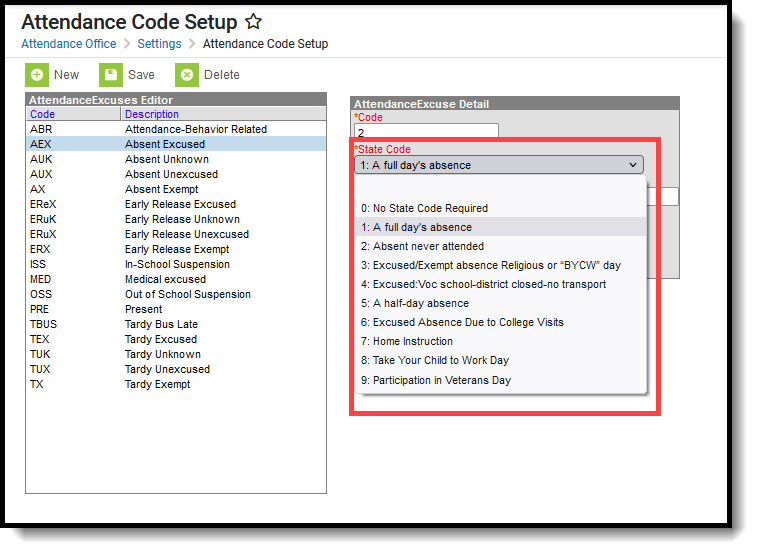 State Codes for Attendance Statuses
Acceptable Attendance Codes for a State Excused Day must have one of the following State Codes selected:
- 3: Excused/Exempt absence, Religious or BYCW day
- 4: Excused Vocational School, District closed no transport
- 6: Excused Absence Due to College Visits
- 8: Take Your Child to Work Day
- 9: Participation in Veterans' Day
Acceptable Excuse Codes for a State Excused Day must have an Excuse value of Exempt.
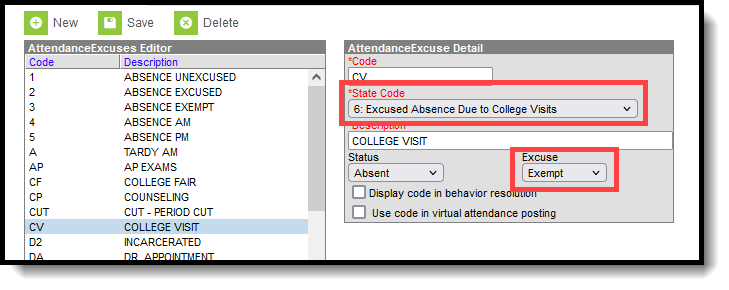 Attendance Code Setup for Excused Day
Attendance entries with a State Code of 5: Half-Day Absence take precedence over every other state code assignment.
The following table lists the State Code and Excuse Codes used to determine whether Present Minutes, Absent Minutes, and Excused Minutes are calculated for an attendance entry.
| Excuse Code | Present Minutes | Absent Minutes | Excused Minutes |
|---|---|---|---|
| Attendance entry with a State Code of 3, 4, 6, 8, or 9: | |||
| U: Unknown | No | Yes | No |
| E: Excused | No | Yes | No |
| X: Exempt | No | No | Yes |
| Attendance entry with a State Code that is NOT 3, 4, 6, 8, or 9: | |||
| U: Unknown | No | Yes | No |
| E: Excused | No | Yes | No |
| X: Exempt | No | Yes | No |
Attendance Period Details Validation
The Period Details Validation generates a list of attendance data for each student within a seven-day range (with start and end dates that must be no more than 7 days apart) for each period of the day, and includes the total number of present and absent minutes for both in-classroom and virtual attendance.
Calculation for Attendance Period Details Validation
The following details the steps used to calculate attendance period minutes. Click on the image to display a larger view.
Step 1. Assign Minutes to Presence or Absence
For each attendance record, a status of Present or Absent is assigned. When students attend in-person classes, an attendance record most often indicates a student was absent. When students attend virtual classes, an attendance record typically indicates that a student was present.
In the image below, a student who was marked absent from in-person classes has a total of 55 minutes absent, while a student who was marked as present for virtual classes has a total of 55 minutes present.
 Attendance Minutes for Present or Absent
Step 2. Adjust based on State Codes 3, 4, 6, 8, 9, and Excuse = Exempt
That 55 minutes of absent/present is adjusted for the state code assigned to the attendance record, as well as the Exempt excuse. Absent minutes for State Code 5 are not adjusted in this step. A state code of 3, 4, 6, 8, or 9 counts those 55 minutes as excused.
 Attendance Entry for Exempt Records
Step 3. Adjust for Minutes Present from Absent Record with Absent Minutes Greater than Zero
The total number of minutes the student is marked as Present is subtracted from the total period minutes. The result is reported as the student's total absent minutes for that period (the value should be greater than zero).
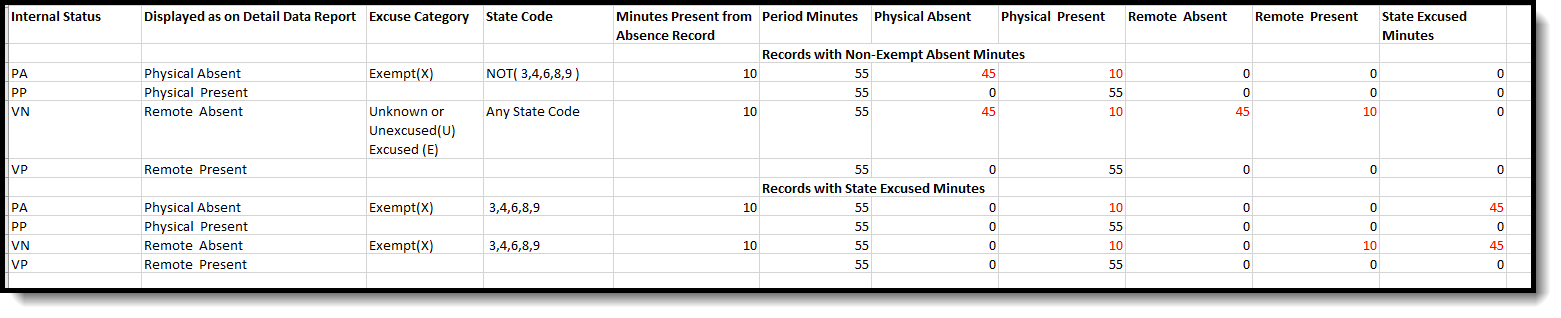 Absent Minutes Greater Than Zero
Generate the Attendance Period Details Validation Report
- Select NJSLEDS SID Management Attendance Period Details from the Extract Type dropdown list.
- Enter a Reporting Period Start Date.
- Enter a Reporting Period End Date. Note that the Start and End Date ranges cannot exceed seven days.
- Mark the Student w/o stateIDs if those students should appear in the report.
- Indicate the Format in which the report should be generated.
- Click the Generate Extract button to generate the report in the desired format. Alternatively, use the Submit to Batch button (if applicable) to choose when the extract is generated.
 SID Management Attendance Period Details
Attendance Period Details Validation Report Layout
| Field | Description | Location |
|---|---|---|
| Detail Report Type | Indicates which validation report displays. Reports Attendance Data by Period for all students. | N/A |
| Calendar | Lists from which calendar the data was pulled. This is the name of the calendar selected in the Report editor. | Calendar > Calendar > Name
Calendar.name |
| Virtual Participation Preference | Indicates whether Virtual Attendance Preferences have been enabled for the selected district.
When the Enable Virtual Attendance checkbox is marked on the Virtual Attendance Preferences tool, it displays a value of Enabled. When it is NOT marked, it displays a value of Disabled. |
Attendance > Virtual Attendance Preferences > Enable Virtual Attendance
|
| Whole Day Absence | Indicates the total number of minutes that is considered a full day of absence. This is the value entered in the Whole Day Absence field on the Calendar Detail tool. | Calendar > Calendar > Whole Day Absence
Calendar.wholeDayAbsence |
| State ID | Reports the student's assigned State ID number. | Census > People > Demographics > Person Identifiers > State ID
Person.stateID |
| Last Name | Reports the last name of the student. | Census > People > Demographics > Person Information > Last Name
Identity.lastName |
| First Name | Reports the first name of the student. | Census > People > Demographics > Person Information > First Name
Identity.firstName |
| Middle Name | Reports the middle name of the student. | Census > People > Demographics > Person Information > Middle Name
Identity.middleName |
| Date | Reports the date of the student's attendance entry. | |
| Share Time Enrollment | Indicates whether the student is full-time enrolled in the selected calendar or shares time with enrollment in another calendar. | Student Information > General > Enrollments > State Reporting Fields > Shared Time |
| Start Time | Lists the start time of the first period in which the student is enrolled. | Calendar > Calendar > Periods > Period Selection > Start Time |
| End Time | Lists the end time of the first period in which the student is enrolled. | Calendar > Calendar > Periods > Period Selection > End Time |
| Scheduled Period Minutes | Reports the total number of minutes in that scheduled period. | Calendar > Calendar > Periods > Period Selection > Period Info |
| Attended Status | Lists the student's status for the day. | Student Information > General > Attendance > Attendance Record > Status |
| District Attendance Code | Lists the attendance code assigned for the attendance entry for that day. | Student Information > General > Attendance > Attendance Record > Code |
| Excuse Category | Indicates whether the attendance excuse is Unexcused, Unknown, or Excused. | Student Information > General > Attendance > Attendance Record > Excuse |
| State Attendance Code | Reports the State Code assigned to the attendance code. | Attendance > Attendance Code > Attendance Excuse Detail > State Code |
| Acceptable Attendance Code for State Excused Days | Indicates whether the attendance state code (3, 4, 6, 8, or 9) is valid for the excused days recognized by the state. Reports Yes or No. | Attendance > Attendance Code > Attendance Excuse Detail > State Code |
| Acceptable Excuse Code for State Excused Days | Indicates whether the excuse reason (Exempt) is valid for the excused days recognized by the state. Reports Yes or No. | Attendance > Attendance Code > Attendance Excuse Detail > Excuse |
| Minutes Present on Absence Record | Reports the total number of minutes the student was considered present for a period when the attendance record indicates an absence. | Student Information > General > Attendance > Attendance Record > Present Minutes |
| Present Minutes | Lists the total number of minutes for which the student was marked present for the entire period. | Student Information > General > Attendance > Attendance Record > Present Minutes |
| Absent Minutes | Lists the total number of minutes for which the student was marked absent.
Unless noted otherwise, a student is considered absent for the entire period. |
Student Information > General > Attendance > Attendance Record |
| Remote Present Minutes | Lists the total number of minutes for which the student was marked present for remote (virtual) learning. | Student Information > General > Attendance > Attendance Record > Present Minutes |
| Remote Absent Minutes | Lists the total number of minutes for which the student was marked absent for remote (virtual) learning. | Student Information > General > Attendance > Attendance Record |
| State Excused Minutes | Lists the total number of minutes the student was marked as excused and approved by the state. | Attendance > Attendance Code > Attendance Excuse Detail > State Code, Excuse |
| Days Open | Reports the total number of calendar days in the selected calendar. | Calendar > Calendar > Days > Start Date, End Date |
Attendance Day Details Validation
Generates a list of attendance data for each student for each day within a 31-day range (with start and end dates that must be no more than 31 days apart), including the total number of present and absent minutes for both in-classroom and virtual attendance.
Calculation for Attendance Day Details Validation
The following details the steps used to calculate attendance day minutes and provides information on how multiple state codes and excused codes are processed in a single day. Click on the image to display a larger view.
Step 1. Determine Primary Attendance Code
Out of the eight periods in one day, three periods have a State Code assigned - two with State Code 3, one with State Code 5. The number of period minutes covered by State Code 3 is 100; the number of period minutes covered by State Code 5 is 50. The primary state attendance code for the day is 3.
 Primary Attendance Code for the Day
Step 2. Summarize the Minutes
8 periods in a day x 50 minutes = 400 total minutes of a day.
A whole day of absence is 240. Of those 400 minutes, the student was physically absent for 80, virtually absent for 40, physically present for 240, and virtually present for 20, with 80 minutes considered excused based on the assigned state code.
 Summary of Day Minutes
Step 3. Calculate Day Absent
When Physically Absent Minutes are greater than the Calendar minutes minus Whole Day Absence, the student has 1 day of absence.
 Days Absent Calculation
Step 4. Shared Time = 1 Absent Day
When the student has a Shared Time Enrollment and the Absent Minutes are greater than the Whole Day Absence are divided by 2, the student has 1 day of absence.
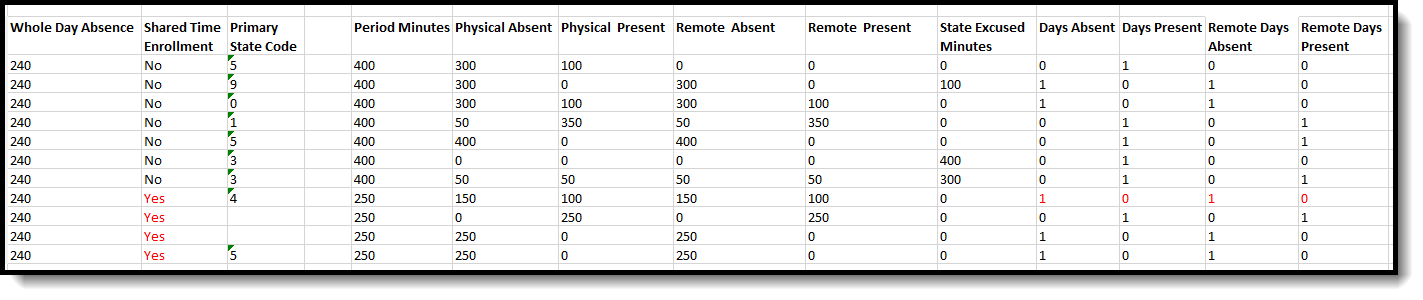 Calculation for Shared Time Enrollments
Step 5. Shared Time = Half Day
When the student has a Shared Time Enrollment, and the Absent Days and Days Present are divided by 2, the student has a half day of absence.
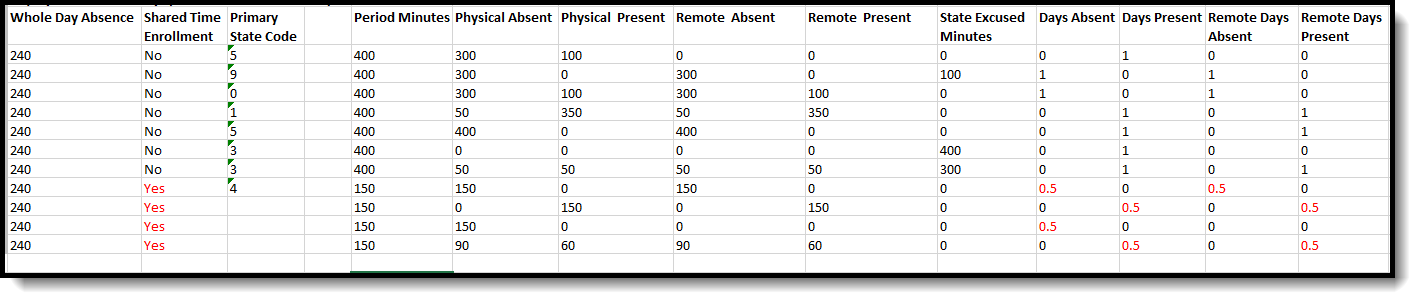 Calculation for Shared Time Enrollments for Half Day Absence
Step 6. Process Primary State Code 5
Attendance Records for days with a primary State Code of 5 do not use absent minutes to determine the daily attendance. These records are treated as half-day absences, and a student is counted as having a full day of attendance, except if the student is a Shared Time student, in which case the student receives a half day (.5) of absence.
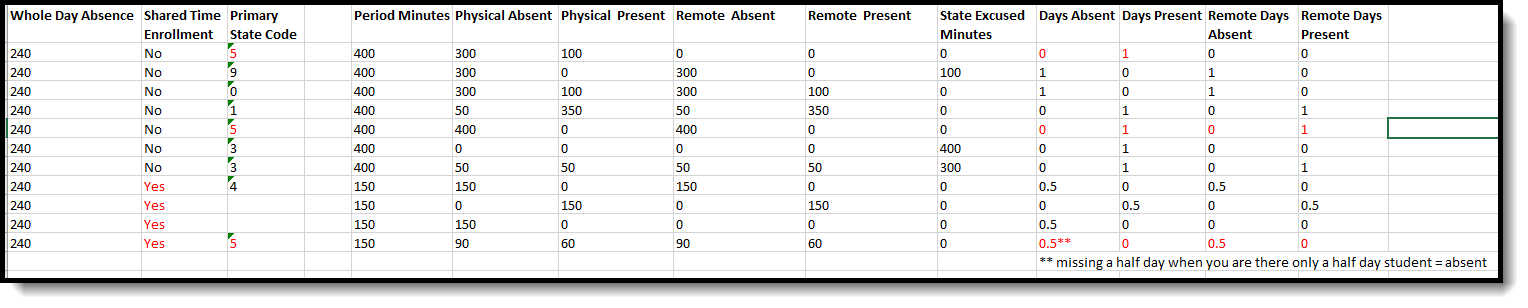 Attendance State Code 5
Step 7. Process Days with All State Excused Minutes
When the total Period Minutes for the day are less than or equal to the Period Minutes State Excused by an Exempt State Code, Days Present and Days Absent equals 0 and Days Excused equals 1.
 State Excused Minutes
Generate the Attendance Day Details Validation Report
- Select NJSLEDS SID Management Attendance Day Details from the Extract Type dropdown list.
- Enter a Reporting Period Start Date.
- Enter a Reporting Period End Date. Note that the Start and End Date ranges cannot exceed seven days.
- Mark the Student w/o stateIDs if those students should appear in the report.
- Indicate the Format in which the report should be generated.
- Click the Generate Extract button to generate the report in the desired format. Alternatively, use the Submit to Batch button (if applicable) to choose when the extract is generated.
 SID Management Attendance Day Details
Attendance Day Details Validation Report Layout
| Field | Description | Location |
|---|---|---|
| Detail Report Type | Indicates which validation report displays. Reports Attendance Data by Day for all students. | N/A |
| Whole Day Absence | Indicates the total number of minutes that is considered a full day of absence. This is the value entered in the Whole Day Absence field on the Calendar Detail tool. | Calendar > Calendar > Calendar > Whole Day Absence
Calendar.wholeDayAbsence |
| Virtual Participation Preference | Indicates whether Virtual Attendance Preferences have been enabled for the selected district.
When the Enable Virtual Attendance checkbox is marked on the Virtual Attendance Preferences tool, displays a value of Enabled. When the Enable Virtual Attendance checkbox is NOT marked, displays a value of Disabled. |
Attendance > Virtual Attendance Preferences > Enable Virtual Attendance |
| State ID | Reports the student's assigned State ID number. | Census > People > Demographics > Person Identifiers > State ID
Person.stateID |
| Last Name | Reports the last name of the student. | Census > People > Demographics > Person Information > Last Name
Identity.lastName |
| First Name | Reports the first name of the student. | Census > People > Demographics > Person Information > First Name
Identity.firstName |
| Middle Name | Reports the middle name of the student. | Census > People > Demographics > Person Information > Middle Name
Identity.middleName |
| Date | Reports the date of the student's attendance entry. | Student Information > General > Attendance
Attendance.date |
| Share Time Enrollment | Indicates whether the student is full-time enrolled in the selected calendar or shares time with enrollment in another calendar. | Student Information > General > Enrollments > State Reporting Fields > Shared Time |
| Period Minutes for the Day | Reports the total number of instructional period minutes for the entire school day. This is usually the same as the Student Day minutes on the Calendar Detail. | Calendar > Calendar > Period > Period Schedule Info > Instructional Minutes
Calendar > Calendar > Student Day (Instructional Minutes) |
| Primary State Code | Reports the State Code assigned to the attendance code. | Attendance > Attendance Code > Attendance Excuse Detail > State Code |
| Acceptable Attendance Code for State Excused Days | Indicates whether the attendance state (3, 4, 6, 8 or 9) code is valid for the excused days recognized by the state. Reports Yes or No. | Attendance > Attendance Code > Attendance Excuse Detail > State Code |
| Present Minutes | Lists the total number of minutes for which the student was marked present for the selected day. | Student Information > General > Attendance > Attendance Record > Present Minutes |
| Absent Minutes | Lists the total number of minutes for which the student was marked absent for the selected day. | Student Information > General > Attendance > Attendance Record |
| Remote Present Minutes | Lists the total number of minutes for which the student was marked present for remote (virtual) learning. | Student Information > General > Attendance > Attendance Record > Present Minutes |
| Remote Absent Minutes | Lists the total number of minutes for which the student was marked absent for remote (virtual) learning. | Student Information > General > Attendance > Attendance Record |
| State Excused Minutes | Lists the total number of minutes the student was marked as excused and approved by the state. | Attendance > Attendance Code > Attendance Excuse Detail > State Code, Excuse |
| Present Days | Reports the total number of days the student was considered present. One day reports as 1.0; less than one day reports as 0.5. | Student Information > General > Attendance > Attendance Record |
| Absent Days | Reports the total number of days the student was considered absent. One day reports as 1.0; less than one day reports as 0.5. | Student Information > General > Attendance > Attendance Record |
| Remote Present Days | Reports the total number of days the student was considered present. One day reports as 1.0; less than one day reports as 0.5. | Student Information > General > Attendance > Attendance Record |
| Remote Absent Days | Reports the total number of days the student was considered absent. One day reports as 1.0; less than one day reports as 0.5. | Student Information > General > Attendance > Attendance Record |
| State Excused Days | Lists in numeric form whether that day of absence is considered exempt by the state and does not count as a day of absence. One day reports as 1.0; less than one day reports as 0.5. | Student Information > General > Attendance > Attendance Record |
| Days Open | Reports the total number of calendar days in the selected calendar. | Calendar > Days > Start Date, End Date |
