The Parent Information tool and the Online Registration Student tool list all applications submitted by the parent/guardian and applications linked to the student.
Parent Information
The Parent Information tool allows staff to find a parent/guardian and review all of the applications the guardian has ever completed. It also lists any students associated with that guardian or living in the same household as that guardian, and indicates whether a student would not be listed on that parent's application.
See the Parent Information article for information on using that tool.
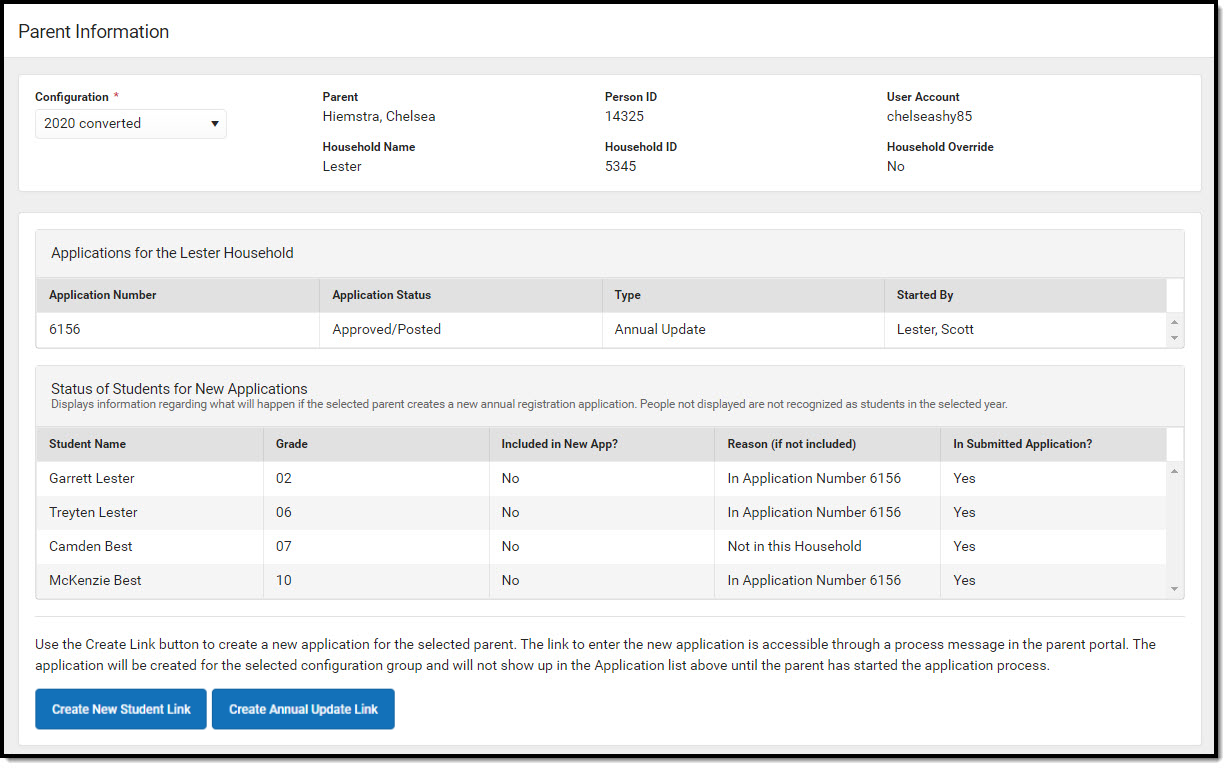 OLR Parent Information tool
Available Tool Rights
| R | W | A | D |
|---|---|---|---|
|
|
|
|
Online Registration Student
The Online Registration Student tool provides a student-level view of a student's application data. Once an application is selected, an Online Registration Summary PDF displays, which can be printed.
 Online Registration Student
Available Tool Rights
| R | W | A | D |
|---|---|---|---|
|
|
|
|
Suggested User Groups
- Online Registration Administrators User Group
- Online Registration Registrars User Group
- Online Registration Health User Group
See User Groups and Suggested Roles for more information.
