Path: Reporting > IL State Reporting > Student Course Assignment
The K-12 Student Course Assignment Extract Version 2 collects grade and course-related information for each student. One entry for each course/section in which students receive a state-reported grade. If the student has multiple enrollments in the calendar where the following state-reported fields have different values in each enrollment, the course/section information reports multiple times:
- Displaced Homemaker
- Single Parent
- RCTDS Fields (home school, serving district, home district, serving district)
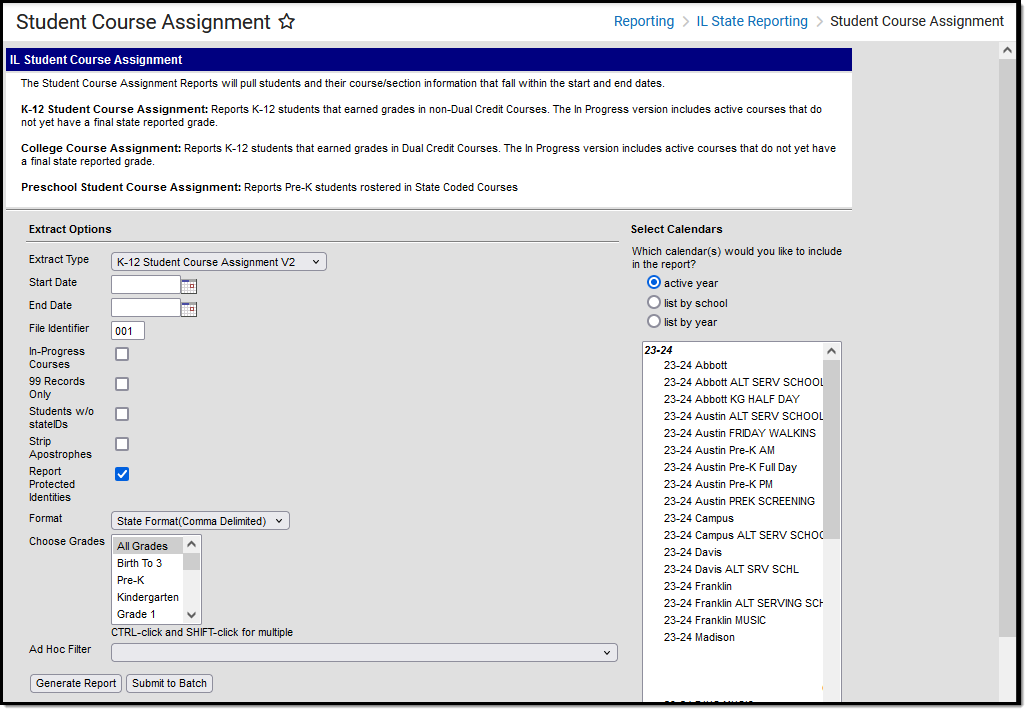 K-12 Student Course Assignment V2
Recommended setup
To prevent duplicate record errors in ISBE SIS submissions, configure multi-term courses (e.g., yearlong or semester) to report on a single final record:
Term Mask: On the course's state-reported Grading Task, check the Term Mask for the final term only (e.g., Term 2 for a two-term course, Term 4 for a four-term course). This ensures the course is extracted once per student upon completion, rather than generating a record for every scheduled term.
Credit Amount: Enter the total potential credit for the entire duration of the course on this grading task.
In-Progress and Early Exits:
Mid-Year Reporting: Prior to the final term, in-progress extracts report the course with a blank final grade until the final grading window is reached.
Withdrawn Students: If a student drops or is roster end-dated before reaching the final term, Campus continues to identify the course through the state-reported grading task and reports a Final Grade of W (Withdrew from course / no credit).
Report logic
Students must have had an active enrollment (including Primary, Special Education, or Partial enrollments) within the selected Start and End dates. They must have been active in a course/section within the Start and End dates. Students must have the following fields populated in order to report:
- End Date
- Final Letter Grade
- Course Credit
Reports for students in grades PK-02 for courses/sections scheduled within the report generation start and end dates, where the State Code field is populated in the Course editor.
Reports for students in grades 03-12 scheduled courses/sections that are scheduled within the report generation start and end dates where the State Code field is populated in the Course editor, and a Grading Task assigned to the course is marked as State Reported.
- When the student is enrolled as of the report generation date, a record is generated only if there is a final grade for each unique combination of Student ID, Course State Code, Section Number, and Term ID on that date. If there are multiple grades for each unique record, a grading task from the most recent term is reported. See the Course End Date and Course Final Grade for additional logic.
This report uses the State Reported indicators to include grading tasks, score groups, and courses.
- A Grading Task must be marked as State Reported.
- Score Groups must have grades mapped to state grades.
- The state-reported Grading Task must be assigned to the Course.
- The State Course Code field must be populated.
- When a student has dropped the course and has no grade, a W reports for the Final Grade.
- Students who have a posted grade tied to the state-reported grading task assigned to the course have a Final Grade reported.
- Students must have a grade posted to a grading task that is associated with the grade task and the score group.
The Course/Section reports once per student unless the following is met:
- The student has the same course throughout the year, but each section has a different number.
- The grading task marked as state reports has the term mask on the course set to more than one term AND the section is scheduled in both of those terms.
- The student has multiple enrollments with different values between the enrollments in any of the following fields:
- Displaced Homemaker
- Single Parent
- RCTDS fields
If a student earns the same grade across multiple terms for the same state-reported grading task and that task is reported multiple times, the student reports multiple times.
A student must be enrolled in a state grade of the following:
|
|
A course does NOT report when it is marked as State Exclude, Dual Credit, or with no score.
Report editor field descriptions
The following fields are available for selection.
| Field | Description |
|---|---|
| Extract Type | Determines which Student Course Assignment Extract generates. For this extract, choose K-12 Student Course Assignment. |
| Start Date | Entered date reflects the start date of enrollment records to return. Dates are entered in mmddyy format or choose the calendar icon to select a date. |
| End Date | Entered date reflects the end date of enrollment records to return. Dates are entered in mmddyy format or choose the calendar icon to select a date. |
| File Identifier | Indicates the 3-digit number attached to the end of the file name and is used to differentiate the file from the other files generated. |
| In-Progress Courses | When marked, the extract reports only students with roster start and end dates between the entered report generation dates. |
| 99 Records Only | When marked, the extract reports only student records whose roster start and end dates fall within the report generation dates. |
| Students without State IDs | When marked, the report returned students who do not have state IDs assigned. |
| Strip Apostrophes | When marked, the following marks are removed from student names and other reported data:
When not marked, these marks are not removed. |
| Report Protected Identities | When marked, student identity information (last name, first name, etc.) reports from the Protected Identity Information fields. |
| Format | Determines how the report generates. Use the State Format (Comma Delimited) when submitting the report to the state. Use the HTML or Tab Delimited option when reviewing data prior to state submission. |
| Student Selection | Select students by choosing one or more grade levels or a saved ad hoc filter to use when generating this report. Only students in the selected grade levels are required to report if they meet the reporting requirements. Only those students included in the filter report if they meet the reporting requirements. |
| Report Generation | The report can be generated immediately using the Generate Extract button. When a larger amount of data is selected (several calendars, a large date range, etc.), use the Submit to Batch button, which allows the user to choose when the report is generated. See the Batch Queue article for more information. |
| Calendar Selection | At least one calendar needs to be selected for the report to generate. Calendars can be chosen by Active Year, by School, or by Year. If a calendar is selected in the Campus toolbar, that calendar is automatically selected. |
Generate the report
- Select the K-12 Student Course Assignment from the Extract Type field.
- Enter the Start Date and End Date for the report.
- Enter a File Identifier.
- If desired, mark the In-Progress Courses checkbox.
- If desired, mark the 99 Records Only checkbox.
- Select the Students w/o stateIDs checkbox to include students without state IDs within the report.
- If desired, mark the Strip Apostrophes checkbox.
- If desired, mark the Report Protected Identities checkbox.
- Select Format in which to generate the report.
- Select students by choosing Grade Levels or an Ad hoc Filter from the dropdown list.
- Select which Calendars to include.
- Select an Ad hoc Filter to reduce the students included in the report (optional).
- Select the Generate Extract button. The report displays in a separate window in the designated format.
This report can also be submitted to the Batch Queue for later generation.
Report layout
The following lists the report field names and descriptions for the Report Header and the Extract itself.
Header layout
Element | Description | Location |
|---|---|---|
FileType | The name of the extract being generated. Reports a value of Student Course Assignment. | N/A |
Total Records | The total amount of records generated. | N/A |
File Name | EN + RCDT or District Name + _ + Date (mmddyyy)_File Identifier (i.e., SCA12_5008210400200_06222005_001.ext) | N/A |
File Date | The date the extract was generated. | N/A |
RCDTS | The Region-County-District-Type-School code that uniquely identifies the school generating the extract. RRCCCDDDDDTTSSSS, 15 characters | District Information > State District Number, Type, Region Number, County School Information > State School Number District.districtID District.county District.region School.number |
Extract layout
Data Element | Description | Location |
|---|---|---|
Student ID | Student's state-assigned identifier. Numeric, 9 digits | Demographics > Person Identifiers > State ID Person.stateID |
SAP ID | Student's district-assigned identifier. Numeric, 5 digits | Demographics > Person Identifiers > Student Number Person.studentNumber |
Last Name | Student's legal last name. When the Report Protected Identities checkbox is marked on the report editor, the student's last name reports from the Legal Last Name field if populated. Alphanumeric, 50 characters | Identities > Last Name Identity.lastName Identities > Protected Identity Information > Legal Last Name Identity.legalLastName |
First Name | Student's legal first name. When the Report Protected Identities checkbox is marked on the report editor, the student's first name reports from the Legal First Name field if populated. Alphanumeric, 30 characters | Identities > First Name Identity.firstName Identities > Protected Identity Information > Legal First Name Identity.LegalfirstName |
Birth Date | Student's date of birth. Date field, 10 characters (MM/DD/YYYY) | Demographics > Person Information > Birth Date Identity.birthdate |
Home RCDTS | The home district of the student that is reporting data. RRCCCDDDDDTTSSSS, 15 characters | District Information > State District Number, Type, Region Number, County District.districtID District.county School Information > State School Number
|
Serving School RCDTS Code | The serving district of the student that is reporting data. RRCCCDDDDDTTSSSS, 15 characters | District Information > State District Number, Type, Region Number, County District.districtID District.county School Information > State School Number
|
School Year | Reports the end year of the school year chosen in the extract editor. Numeric, 4 digits (YYYY) | School Year Setup > School Year Editor > Active year Calendar.year |
Term | Identifies in which term the class was taken. Terms include semesters, trimesters or year long courses.
One of the following options reports, based on the selected value on the Sections editor for the Term Code field:
Numeric, 2 digits | Course Information > Section > Term Code Calendar.term |
State Course Code | State number assigned to the course editor. Alphanumeric, 4 characters | Course Information > Course Editor > State Code Course.statecode |
Local Course ID | School/District number assigned to the course. Alphanumeric, 4 characters | Course Information > Course Editor > Number Course.number |
Local Course Title | School/District name of the course. Alphanumeric, 15 characters | Course Information > Course Editor > Name Course.name |
Student Course Start Date | Date the student begins attending the course. Date field, 10 characters (MM/DD/YYYY) | Schedule Section.startDate |
Section Number | Number of the course section being reported. Numeric, 4 digits | Section Information > Number Section.number |
Course Level | Selection indicates the level of the course. If a course/section is assigned a value of 05: Special Education, a null value reports.
Numeric, 2 digits | Course Information > Course Level Course.level |
Course Credit | Reports the potential credit amount a student could earn by completing this course section. The value is calculated as follows:
If there are multiple grading tasks that meet requirements in number 1, the total potential credit is found for each grading task, then summed for the total. If the student is enrolled in a state grade of K-08 AND there is no potential credit available, a value of 1.00 reports. If the student is enrolled in a state grade of 09-12 AND there is no potential credit available, a value of 0.00 reports. Reports up to three decimal places. If the number ends in zero, reports to two decimal places. Numeric, 4 characters (X.XXX) | Course Grading Tasks > Grading Task Editor > Credit Amount Section Information > Section Placement |
Articulated Credit | Indicates the student receives college credit for the course (based on the value assigned to the course) upon successful completion of the course while the student is in high school. Additional coursework might be needed at the college level. Extract reports the code associated with the Yes or No value (01 - Yes, 02 - No). Numeric, 2 digits | Course Information > Articulated Credit Course.articulatedCredit |
Dual Credit | Indicates the student receives both high school and college credit for approved high school courses that follow additional and specific criteria qualifying it as a college-level course. Extract reports the code associated with the Yes or No value (01 - Yes, 02 - No). Numeric, 2 digits | Course Information > Dual Credit Course.dualCredit |
Course Setting | Selection of how the course is delivered to the students for instruction. Options are:
Numeric, 2 digits | Course Information > Setting Course.setting |
Actual Attendance | N/A | N/A |
Total Attendance | N/A | N/A |
Single Parent | Indicates the student meets the federal requirements for being reported as a Single Parent based on the most recent enrollment in the selected calendar (01 - checkbox selected, 02 - checkbox not selected).
Numeric, 2 digits | Enrollment > State Reporting Fields > Single Parent Enrollment.singleParent |
Out-of-work-individual | Indicates the student meets the federal requirements for being reported based on the most recent enrollment in the selected calendar (01 - Displaced Homemaker checkbox selected, 02 - Displaced Homemaker checkbox not selected).
Numeric, 2 digits | Enrollment > State Reporting Fields > Displaced Homemaker Enrollment.displaceHomemaker |
Course Numeric Grade | N/A | N/A |
Maximum Numeric Grade | N/A | N/A |
Course End Date | End date of the course based on the student's schedule and roster end date.
Future end dates do not report. Date field, 10 characters (MM/DD/YYYY) | Section Information > end Date Section.endDate Schedule |
Course Final Grade | The student's final grade in the course, based on the grading task grade posted to the student. This score includes successful completion, failure or otherwise. Logic for this value looks first to the State Course Score.
When the In-Progress checkbox is marked, records report for students where their student roster start date or end date is within the report generation dates.
When In-Progress is NOT marked, enrollments that have ended and do not have a score report as 17 (Withdraw). When 99 Records Only is marked, all records report a value of 99. When erroneous record is sent, a value of 99 reports. See the State Course Scores table for a list of reported values. Numeric, 2 digits | Score Group & Rubric Setup > Score Group > State Course Score Score.gradingTask |
| Language Code Course was Taught In | Reports the assigned Language code from the Course tab. If no language is selected, reports a value of 000. Numeric, 3 digits | Course Information > Course Language Course.instructionLanguage |
| Competency Based Education | Indicates the course is considered part of Competency Based Education. Reports 01 when the Competency Based Education checkbox is marked on the Course tab. Otherwise, reports 02. Numeric, 2 digits | Course Information > Competency Based Education Course.competencyBased |
State course scores
| Code | Name | Description |
|---|---|---|
| 01 | A+ | Student received course term credit. |
| 02 | A | |
| 03 | A- | |
| 04 | B+ | |
| 05 | B | |
| 06 | B- | |
| 07 | C+ | |
| 08 | C | |
| 09 | C- | |
| 10 | D+ | |
| 11 | D | |
| 12 | D- | |
| 13 | F | Student did NOT receive course term credit. |
| 14 | S | Satisfactory or Pass. Student received course term credit. |
| 15 | U | Unsatisfactory. Student did NOT receive course term credit. |
| 16 | I | Incomplete. Student was enrolled on Course End Date. Student did NOT receive course term credit. |
| 17 | W | Withdrew from course. Student did NOT receive course term credit. Student was not enrolled on Course End Date. |
| 18 | WP | Withdrew from course. Student did receive course term credit. Student was not enrolled on Course End Date. |
| 19 | Audit | Student audited the course. student did NOT receive course term credit. |
| 20 | X | Student waived from course requirement. Student did NOT receive course term credit. Student did NOT receive a final grade. |
| 21 | Above Average | Student's performance exceeds expectations (Grades K-8 only). |
| 22 | Average | Student's performance meets expectations (Grades K-8 only). |
| 23 | Below Average | Student's performance was below expectations (Grades K-8 only). |
| 24 | P | Student was promoted at end of term (Grades K-8 only). |
| 25 | R | Student was retained at end of term (Grades K-8 only). |
| 26 | N | Student did not complete the term (Grade K-8 only). |
| 27 | Exceptional | Student demonstrates the skill or understands the concepts at a level exceeding expectations for the reporting period. |
| 28 | Meets Standard | (Developing Appropriately) Student usually demonstrates the skill or understands the concepts and meets expectations for the reporting. |
| 29 | Approaching Standard | (Beginning to Develop) Student sometimes demonstrates the skill or understands the concepts and meets some expectations for the reporting period. |
| 30 | Below Standard | (Needs to Develop) Student seldom demonstrates the skill or understands the concepts and is not meetings expectations for the reporting period. |
| 99 | Erroneous | Record entered in error. School district mistake. |
