A few staff members need access to the Settings tools in Behavior. Access should be given to staff responsible for managing system preferences and maintaining codes, for example, when the state or district updates behavior codes.
To learn more about these tools, see the articles in the Behavior Office Settings category.
Behavior Preferences
Behavior Preferences allows users to set preferences for what participant information is included in reports and which users are automatically notified of submitted referrals.
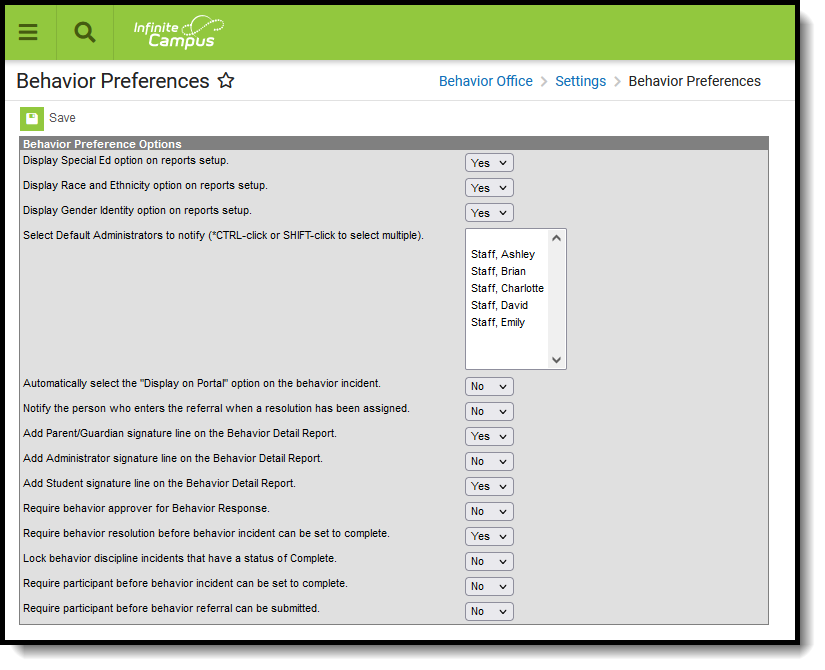 Behavior Preferences
Available Behavior Preferences Tool Rights
| R | W | A | D |
|---|---|---|---|
| View preferences. | Modify preferences. | N/A | N/A |
Event Type Setup
Behavior Event Types can be created for an entire district or for individual schools within the district. Districts and schools can create their own codes if necessary per district policy.
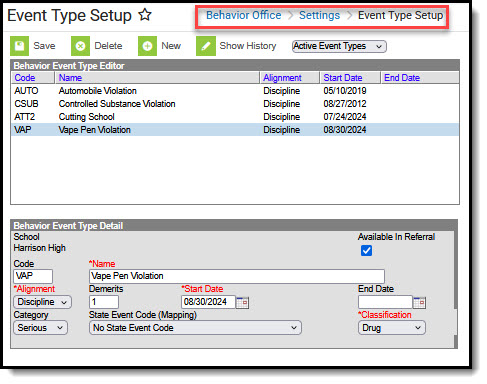 Event Type Setup
Available Event Type Setup Tool Rights
| R | W | A | D |
|---|---|---|---|
| View existing Event Types. | Modify existing Event Types. | Add new Event Types (required in order to use the Merge tool). | Delete Event Types. |
Resolution Type Setup
The Resolution Types tool allows users to create and manage resolution codes assigned to student behavior events. Codes can be created at the school or district level.
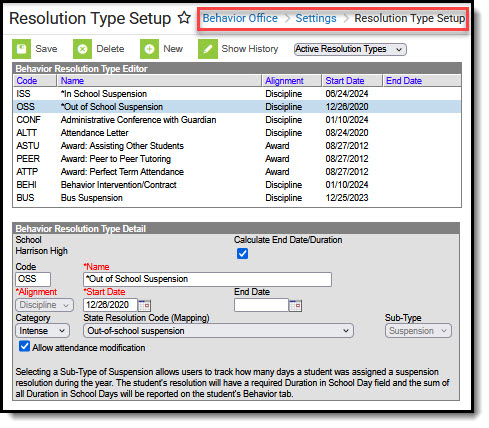 Resolution Type Setup
Available Resolution Type Setup Tool Rights
| R | W | A | D |
|---|---|---|---|
| View existing Resolution Types. | Modify existing Resolution Types. | Add new Resolution Types (required in order to use the Merge Tool). | Delete Resolution Types. |
Response Type Setup
Behavior Response Types are assigned to behavior incidents that require a restraint to be administered by approved personnel.
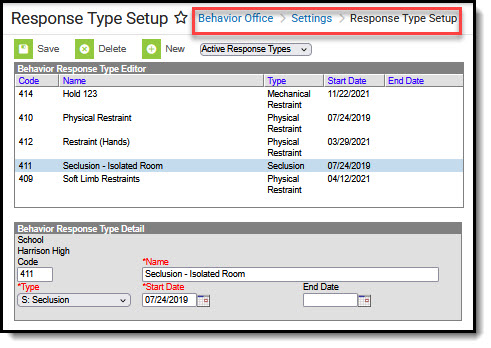 Response Type Setup
Available Response Type Setup Tool Rights
| R | W | A | D |
|---|---|---|---|
| View existing Response Types. | Modify existing Response Types. | Add Response Types. | Delete Response Types. |
Suggested User Groups
Typically, users of this tool have already been assigned one or more Product Security Roles that grant administrative-level access; therefore, a user group assignment is not necessary.
If your district's needs differ, you may choose to create a group that addresses those specific needs.
See User Groups and Suggested Roles for more information.
